Introduction When organizing accessory candidates from fashionreps' Crocs catalog, the real problem isn't "how many items you see," but how to save the items worth revisiting along with their colors, specs, page URLs, and verification dates. The site catalog is great for discovery and initial screening, while Google Sheets is better for long-term organizing, filtering, and collaboration. Clearly dividing the roles of these two tools reduces repetitive checking, prevents broken links from becomin
Editor score 4.2 / 5
Introduction
When organizing accessory candidates from fashionreps' Crocs catalog, the real problem isn't "how many items you see," but how to save the items worth revisiting along with their colors, specs, page URLs, and verification dates. The site catalog is great for discovery and initial screening, while Google Sheets is better for long-term organizing, filtering, and collaboration. Clearly dividing the roles of these two tools reduces repetitive checking, prevents broken links from becoming untraceable, and avoids treating unverified information as confirmed options.
This article focuses on one specific task: discovering candidate items from fashionreps' Crocs category page and building a Google Sheets checklist that can be further verified. Reference prices, sizes, or product options are not treated as permanent facts; before ordering, you should still reopen the product page and the shopping agent page to confirm.

What This Solves for Organizing crocs Accessory Candidates
This method suits people in the following stages:
- You roughly know you want Crocs accessories or related items but haven't settled on specific candidates.
- You need to compare different colors, styles, specs, and product pages rather than ordering immediately.
- You want to hand off candidates to yourself or a partner for further verification, avoiding reliance on browser history alone.
- You need to record when a product page was seen, which fields are confirmed, and which info still needs review.
By the end, you should be able to do three things: first, narrow down the range in fashionreps' Crocs catalog; second, organize candidates into Google Sheets; third, mark each item's images, options, page status, and verification date.
This method is not meant to treat catalog reference prices as final payment amounts, nor to confirm stock, shipping, taxes, customs requirements, or after-sales outcomes. The shopping agent handles orders, payment, and shipping; the catalog page mainly serves as a discovery and comparison entry point.
How to Locate Accessory Categories and Product Cards in fashionreps' Website Spreadsheet
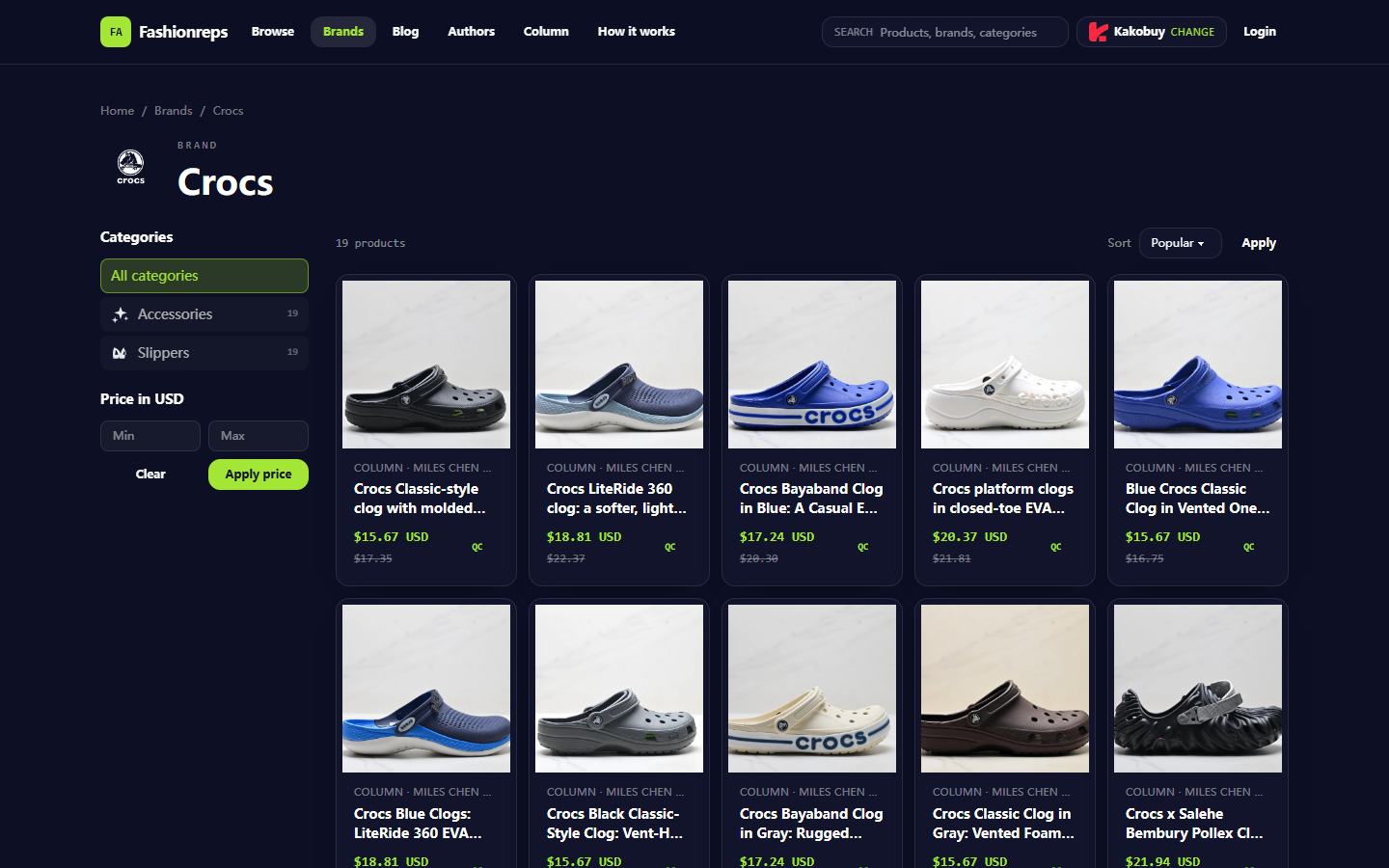
After entering the Crocs brand catalog, observe the categories and filters the page provides. The current page divides products into Accessories and Slippers, showing item counts, price range filters, and sorting options. For accessory candidates, the first step should be entering the Accessories category, then doing an initial screen based on the product cards actually displayed.
Product cards are typically good for quickly recording the following:
- Product name or page title.
- The reference price and original reference price shown on the page, if still available.
- Visible color, size, or spec descriptions.
- The product detail page link.
- Whether the page shows QC or other entries for further verification.
The value of the catalog page lies in placing multiple products in the same browsing environment for comparison. For example, the current Crocs page shows 19 products and offers sorting options like Popular, Latest, Price: low to high, and Price: high to low. This count and sorting state are snapshots at the time of verification and should not be written down as a permanent catalog size.
It's advisable to use the catalog page for "keep or discard" decisions first, rather than filling in every field in the first round. Keep candidates directly relevant to your current needs, such as those with clear colors, clear images, recognizable product names, and pages that load properly. Items with vague names, insufficient images, broken links, or only tags without product details should be marked as pending verification, not directly added to a purchasable list.
How to Set Up Columns for Color, Specs, Links, and Verification Date in Google Sheets
Google Sheets' advantage isn't replacing the product catalog, but turning scattered judgments into revisitable records. At minimum, set up the following columns:
| Field | What to Record | Verification Method |
|---|---|---|
| Product Name | Copy the visible name from the page; add color or style if needed | Check against the product detail page |
| Category | Accessories, Slippers, or other categories shown on the page | Base on catalog filter results |
| Color | Colors explicitly shown on the page; write "To confirm" if unsure | Check options, images, and detail description |
| Specs | Size, quantity, compatibility info, or other visible specs | Don't infer unlisted specs from images |
| Product Page URL | Save the product detail page URL | Periodically open to check accessibility |
| Reference Price | Record the currency and amount shown on the page | Re-verify before ordering; don't treat as final cost |
| Image Verified | Yes, No, or To review | Compare product card and detail page images |
| Page Status | Accessible, Redirected, Empty, To confirm | Judge by reopening the page |
| Verification Date | Use YYYY-MM-DD format | Update after each significant review |
| Notes | Color doubts, missing specs, questions to ask the agent | Write only actionable items |
For the color field, it's best not to just write subjective summaries like "black" or "blue." If the page explicitly states a color name, record it as written; if the color only appears in images without text, mark it as "image observation, to confirm" to avoid mistaking visual judgment for a product option.
For the specs field, also distinguish between "explicitly listed on the page" and "inferred from images." For example, if the page shows a size range, record that range; if no sizes are shown, don't infer available options from the same item in other colors.
The verification date is a key field in this sheet. Prices, stock, page structure, available options, and agent redirects can all change, so before each order, re-confirm the candidate rows rather than relying only on previously saved content.
Differences in Steps Between Website Browsing and Sheet Filtering for Candidate Discovery
The website catalog and Google Sheets solve two different problems: the website is for discovery, the sheet for memory and decision-making.
On the website, the recommended order is:
- Enter the Crocs brand catalog and confirm the page is still accessible.
- Select the Accessories category and observe the actual number of products returned.
- Use sorting to quickly view popular, latest, or price order.
- Open candidate product cards and confirm name, images, and visible specs.
- Write items worth further verification into Google Sheets.
- For now, do not mark pages that won't open, pages with only tags, or items with incomplete info as confirmed.
On the sheet side, you can continue using filters for secondary organization, such as:
- Show only items with images verified.
- Show only items with page status "Accessible."
- Filter candidates by color.
- Sort by verification date from oldest to newest to prioritize reviewing older records.
- View items with missing specs or questions separately.
- Assign statuses like "To review," "To compare," and "Confirm before ordering" to different members.
This division of labor avoids a common problem: browsing many products but not being able to say which one has been confirmed and which one is just an impression from images. 🧾
How to Verify Product Images, Options, Links, and Update Times Item by Item
It's recommended to break verification into four independent checks, rather than marking an item as complete just because the page opens.
Image Check
Confirm that the product card image and the detail page image belong to the same product. Images can only support observation of appearance; they cannot prove material, actual feel, durability, or real stock. If images are clearly missing, fail to load, or don't match the title, record the issue in notes.
Options Check
Check whether the page explicitly lists color, size, model, or quantity options. Don't fill in options that aren't shown. For cases where different colors may correspond to different pages, save each page URL separately rather than merging multiple colors into one row.
Link Check
Open the saved product page URL and check whether you can still see a clear product name and enough visible information. Redirects, 404s, blank pages, or pages with only category tags should not continue to be used as confirmed product pages. If the site redirects to a shopping agent, further confirm that the agent page shows the product, options, and prices corresponding to the original candidate.
Update Time Check
Record the date of the last complete verification. For products whose price, stock, options, or page structure has changed, update notes and re-evaluate whether they're still worth keeping. Don't just update the date without checking the content, otherwise the date creates a false sense of having re-verified.
If you need to collaborate with others, you can add three columns: "Assignee," "Review Status," and "Issue Description." Each person works only on clearly assigned candidates and keeps the original page info to reduce duplicate verification and overwriting.
When Mobile Quick Browsing and Desktop Long-Term Organizing Are Each Suitable
Mobile is better for quickly discovering candidates. It's convenient for browsing product images, checking categories, and temporarily saving a few pages in a short time, but it's not suited for comparing many fields at once or for long periods of complex filtering. Mobile records can be written into a temporary area first, then filled in later.
Desktop is better for long-term organizing, especially these tasks:
- Opening the catalog page, product detail page, and Google Sheets simultaneously.
- Comparing colors, specs, reference prices, and verification dates side by side.
- Using filters to find items to review.
- Handling duplicate candidates and splitting different color pages.
- Collaborating with partners and keeping notes.
If you just want to quickly save two or three candidates, mobile browsing is enough; if you have more than a few candidates, or you'll later compare purchasing agents and logistics conditions, it's safer to move to a sheet sooner. 📱
Data Timeliness and Fact Verification Boundaries for Both Tools
The website catalog is a dynamic entry point; Google Sheets is a manually maintained record. Neither can automatically guarantee that information is always valid.
Treat the following as highly volatile fields:
- Reference price and original reference price.
- Available colors, sizes, or other specs.
- Whether the product page still exists.
- Whether images have been updated.
- Whether the shopping agent redirect still works.
- Stock, shipping, taxes, and after-sales conditions.
The sheet helps you remember "when you saw what," but it cannot replace pre-order re-verification. In particular, reference price is not equal to final payment amount; the final cost may also be affected by the shopping agent's service fee, international shipping, taxes, packaging, route restrictions, and exchange rate changes. Customs and import requirements should also be confirmed according to the destination country's current regulations and carrier requirements, not evaded through under-declaring or splitting shipments. ⚖️
If a candidate needs to enter the actual purchase process, it's recommended to add a "Pre-order Confirmation" column in the sheet and mark it as passed only after re-checking all of the following: product page accessible, options clear, price and currency updated, agent page matches, destination transportation and compliance conditions understood.
Final Action: Build a Revisitable crocs Accessory Candidate List
You can create the first version of the list with a short process:
- On the fashionreps Crocs page, select Accessories and record the categories and count displayed at that time.
- Browse product cards according to your needs, keeping candidates with relatively complete names, images, and page information.
- Create a separate row for each color or different spec page; don't merge unconfirmed options.
- In Google Sheets, add the product page URL, reference price, specs, page status, and verification date.
- Open detail pages one by one and check that images, options, and links are consistent.
- Put incomplete, inaccessible, or further-confirmation-needed items into a "to review" status.
- Before ordering, re-verify price, stock, agent page, shipping, taxes, and destination restrictions.
The direct benefit of organizing this way is reducing repeated searches and missing revisit information; the cost is maintaining the sheet and re-verifying when pages change. It suits people with multiple candidates, needing to compare colors or specs, and needing to collaborate with others. Situations where relying solely on this list is not recommended include: product pages already invalid, key information long missing, or you're ready to pay directly based on old prices and old options.
A truly reliable candidate sheet isn't about having as many products as possible, but that each row can answer three questions: what is it, when did I check it, and what's still missing for the next step. ✅
Agent Platform Shopping FAQ
1. Which product categories are listed in the spreadsheets on litbuy-ai.com?
The spreadsheets available at litbuy-ai.com cover footwear, apparel, bags, accessories, jerseys, perfumes, hats, scarves, belts, and various household daily necessities.
2. What should I do if I am not happy with the item I received, and how can litbuy-ai.com help?
As soon as possible, reach out to the customer service team of your agent platform. For Chinese sellers, most non-specialty goods offer a 5-day return and exchange policy without requiring a reason. If you are dissatisfied, you may ask for a return. If the package has already shipped from the warehouse and reached your location, and you find a quality problem, contact the agent platform's customer service team so they can assist in contacting the seller to discuss a compensation arrangement.
Below are the customer service emails for each platform:
kakobuy: service@kakobuy.com
oopbuy: support01@oopbuy.com
usfans: support@usfans.com
hipobuy: care@hipobuy.com
superbuy: care@superbuy.com